AJAX Smart Bracket Motion Protect (White)

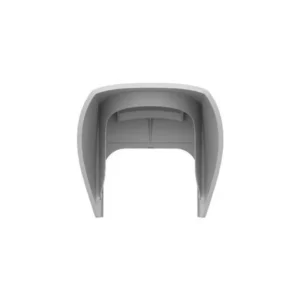
The AJAX Smart Bracket Motion Protect (W) is a white mounting bracket made for the AJAX Motion Protect motion detector. It belongs to the AJAX wireless alarm system family, a range of hubs, keypads, sensors and accessories that work together to detect intrusion and alert the people responsible for a property.
A motion detector is only as effective as its position. A stable mounting bracket holds the detector firmly in the intended place and allows it to be aimed at the area that needs coverage. This accessory is therefore a useful part of a well-planned installation, especially where the detector must be fixed to a wall or ceiling in a particular orientation.
Key details
- Product type: mounting bracket accessory for AJAX Motion Protect motion detector
- Colour: white (W), matching the white version of the detector
- System: AJAX wireless alarm system
- Brand: AJAX
- Article number: A-SMARTBRKPIRMOTION
Design and installation
The white finish allows the bracket to blend in with light-coloured walls and ceilings, so the alarm component remains discreet. AJAX components are designed to be installed without complicated wiring, and a dedicated bracket helps keep the detector stable once it is fitted. Installers should follow the instructions supplied with the AJAX system and confirm that the bracket and detector are used together as intended.
Compatibility
This bracket is intended for use with the AJAX Motion Protect detector. Before purchase, check that the model and colour match your existing or planned system. Mixing components from different product families may not give the expected result, so it is wise to confirm compatibility with a supplier or qualified installer.
Typical uses
- Securing an AJAX Motion Protect detector to a wall or ceiling
- Adding or replacing a detector in an existing AJAX alarm installation
- Positioning a motion detector to cover entrances, hallways or rooms
- Installations where a white component suits the interior decor
- Residential and small commercial alarm projects
Who should choose this product
This accessory suits homeowners, property managers and installers who already use or plan to use AJAX wireless alarm components. It is a simple, focused item: it does not add detection by itself but provides the mounting support needed for the motion detector to work well in its location.
Planning the installation
Good planning makes a big difference. Decide where the detector should watch, consider the height and viewing direction, and avoid positions where direct sunlight, heat sources or moving objects might cause unnecessary alarms. Once the bracket is fixed, test the detector and check that its coverage matches your plan. If your system needs adjusting later, the bracket makes it easier to reposition the detector without starting again.
Ordering advice
When ordering, confirm the article number A-SMARTBRKPIRMOTION and the white colour variant. Keep a note of the detector model and the rest of the system so that you can match accessories correctly. If you need help deciding between options or fitting the component into a larger system, ask a qualified security installer for advice.