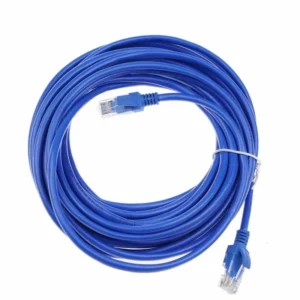
CAT6E Patch Lead 2M, 3M, 5M, 10M and 20M
The CAT6E patch lead is a networking cable designed for short connections between network equipment and end devices. It is offered in five lengths: 2 metres, 3 metres, 5 metres, 10 metres and 20 metres. This range lets you match the cable to the distance between your devices, which helps keep installations tidy and reduces unused cable.
Product Overview
A patch lead is a pre-terminated cable used to make a direct connection between two points in a network. Typical examples include linking a switch to a patch panel, a router to a modem, or a desktop computer to a wall outlet. The CAT6E patch lead belongs to the networking cable category and is intended for these everyday connection tasks.
Available Lengths
Each length in the range serves a different purpose:
- 2 metres: short connections between adjacent devices, such as a switch and a patch panel in the same rack.
- 3 metres: connections between equipment on the same desk or in a small cabinet.
- 5 metres: general desk and office connections where devices sit a short distance apart.
- 10 metres: connections across a room or between a wall outlet and equipment.
- 20 metres: longer runs where the devices are further apart.
Key Features
- Cat6E patch lead for network connections.
- Available in 2M, 3M, 5M, 10M and 20M lengths.
- Suitable for linking switches, routers, patch panels and end devices.
- Part of the shop’s networking cable range.
Typical Uses
Patch leads like this one are used in a wide variety of settings. In an office they connect computers, phones and printers to wall outlets and switches. In a server room or comms cabinet they link network switches, routers and patch panels. In a home or small business they can connect a router to a games console, a media device or a wired access point.
Using the right length is the simplest way to keep a network neat. A lead that is too long creates loops and clutter, which can make cable management difficult and make faults harder to trace. Choosing the closest suitable length keeps the installation organised.
Choosing the Right Length
Measure the route the cable will take, not just the straight-line distance between the two devices. Allow for bends, vertical runs and any slack needed at either end. If the route is uncertain, it is usually better to select the next length up rather than trying to make a short lead reach.
Installation Tips
- Route the cable away from power cables where possible to reduce interference.
- Avoid sharp bends and tight kinks in the cable.
- Label both ends so connections can be identified easily later.
- Use cable ties or management accessories to keep runs neat.
The CAT6E patch lead offers a practical, straightforward solution for connecting network equipment at the lengths most commonly needed in offices, homes and communications rooms. Compare the five lengths to find the one that suits your installation.