UTP Combo Crimp Tool RJ11/RJ12/RJ45
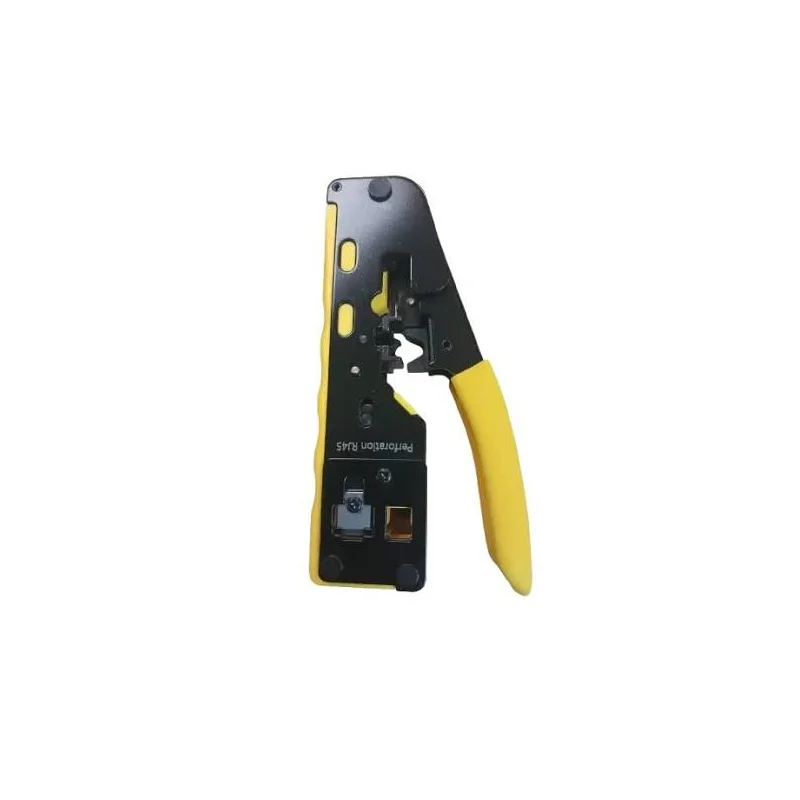
The UTP Combo Crimp Tool RJ11/RJ12/RJ45 is a hand-operated crimping tool for terminating unshielded twisted pair cable with modular plugs. It brings together the crimping functions needed for RJ11, RJ12 and RJ45 connectors in one tool, which makes it a practical choice for anyone who regularly works with telephone and network cabling.
What the tool is for
Modular connectors are used at the ends of copper cables to link devices to a telephone line, a data network or a patch panel. Terminating them correctly means each wire sits in the right position inside the plug, and the crimp action forces the contacts through the insulation of each conductor and holds the plug firmly on the cable jacket. The tool performs this crimping step, so the job can be completed quickly and without soldering.
Connector types covered
- RJ11: six-position connector, typically used for single-line telephone cable
- RJ12: six-position connector with all six contacts fitted, used for multi-line telephone wiring
- RJ45: eight-position connector, the standard plug for Ethernet network cable
- Cable type: UTP (unshielded twisted pair) copper cable
- Tool type: hand crimp tool for modular plugs
Typical uses
Installers and electricians use this type of tool when fitting new telephone sockets, network outlets or patch leads. IT technicians rely on it to make replacement network cables on site, and home users find it handy for repairing a damaged cable end or making a custom length of cable. Because it covers both six-position and eight-position plugs, it suits mixed work where several connector formats are in use.
Working tips
Strip the outer jacket to the length recommended for your plug, arrange the conductors in the correct wiring order, trim them evenly and insert them fully into the plug before crimping. Check the finished end visually, and test the cable with a continuity or network tester before connecting it to equipment. Keep the crimping jaws clean and free of debris so the plugs are formed consistently.
Who should buy it
This tool is aimed at trades people, IT staff, facilities teams and hobbyists who need a dependable way to finish modular cable ends. If you only occasionally terminate cables, a combo tool like this avoids buying separate crimpers for each connector type. Confirm that your plugs and cable match the RJ11, RJ12 or RJ45 format before you start.