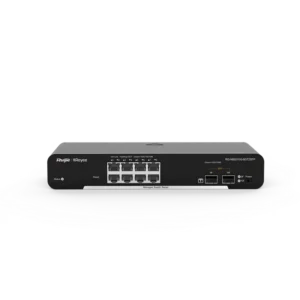
Ruijie 10-Port PoE Smart Switch with 120W PoE Power

The Ruijie 10-Port PoE Smart Switch with 120W PoE Power is a networking switch for building or extending a local area network where some of the connected devices also need electrical power. Combining ten network ports with a 120W PoE power budget, it gives installers and IT staff a single device that handles both data and power for compatible equipment.
Ethernet switches are the central points of a wired network. They receive data from one device and forward it to the correct destination. A PoE switch does this and also delivers electrical power over the same copper cable to devices that support Power over Ethernet. This is useful for devices installed on ceilings, walls or poles, where a separate power outlet would be costly or inconvenient.
Key features
- 10 network ports for connecting computers, servers, printers and other wired equipment
- PoE power over Ethernet for compatible powered devices
- 120W total PoE power budget shared across the powered ports
- Smart switch category, offering more control and configuration options than an unmanaged switch
- Ruijie brand networking hardware
Power over Ethernet explained
PoE removes the need for a separate power adapter at each powered device. The switch detects compatible equipment and sends power through the same cable that carries data. The total power budget of 120W limits how many and which kinds of devices can be powered at the same time. Each device draws a different amount of power, so it is worth adding up the expected load of the cameras, access points or phones before connecting them.
Smart switch functions
A smart switch is positioned between a basic unmanaged switch and a fully managed switch. It usually provides some settings for traffic handling, port control and monitoring, without the complexity of a full enterprise platform. For many small and medium networks this balance is practical: the switch can be set up quickly, and the administrator still has the option to adjust settings when the network changes.
Typical uses
This switch is suited to several common scenarios:
- Powering IP security cameras mounted at entrances, car parks or corridors
- Supplying wireless access points so that Wi-Fi coverage can be placed where it is needed
- Connecting VoIP desk phones at reception areas and offices
- Building a compact network for a small office, shop or branch site
- Providing a central switching point for workstations and printers alongside powered devices
Planning the installation
Before ordering or installing, it helps to review the network layout. Count the number of powered devices and check their power requirements. Make sure the combined load stays within the 120W budget, with some margin for future expansion. Plan cable runs within the standard length limits for Ethernet cabling, and place the switch in a ventilated, dry location with access to a suitable power supply.
Who it is for
The switch will interest network installers, IT managers in small and medium businesses, and anyone upgrading a site where cameras, access points or phones currently need separate power. It can also serve as a convenient expansion point for an existing network that already uses Ruijie equipment.
When choosing networking hardware, always confirm that the switch matches the needs of the network, including port speeds, PoE standard and management requirements. For questions about compatibility with specific devices, contact the supplier or a qualified network installer before purchase.